
Got Meta Ad Account Changes? See How to Navigate Them.
A practical guide to Meta’s recent Advantage+ default account changes.
Meta Ad Account changes, coming to an Ads Manager near you (if they haven't already)!
We all have our feelings about Meta. And let's be real, our feelings probably change every day, or maybe even more than once a day. When it's kicking tail, we love it. When they make a change without the courtesy of a heads-up email, "hey, your account is going to look different tomorrow," we feel...different emotions.
But no matter how you're feeling about Meta today, a few foundational truths remain. Meta is a great place to get leads for a low CPL. It's an effective channel to connect with both B2B and B2C prospects. And it has a place in our channel strategy, so when it changes, we must adapt.
If your ad account looked different this week, you're not alone. On Tuesday, about half of our client accounts had a different UI. We spent the week digging into the new user experience so we can help you navigate the change to default Advantage+ accounts.
The TLDR on this email (we know it's long...sorry, but there's a lot to cover:
Don't freak out. Your ad account is fine. You're not crazy, toggles and manual overrides aren't in the same places, but there are still some manual controls. And if you want to talk more about any of this, reach out directly to us!
📰 Also...This Just In
Also, if you missed it, Meta just announced that they're laying off 10% of their workforce in favor of dropping cash into AI innovation. Not a big surprise given the hard push to Meta's Advantage+ AI tools, and the perfect backdrop to this newsletter.
Advantage+ Isn't A New Concept
First, let's start here. Advantage+ isn't new. We've all been navigating Advantage+ audiences, placements, and budget optimizations for years. If you are a Meta power user, you've probably already experimented with these tools. If you're new to Meta, then you've likely been using these tools without realizing it.
What may feel new is having Advantage+ options set as the default for your campaigns. As of April 2026, Meta has completed a major, company-wide transition to AI-powered automation, resulting in the removal or hiding of many manual settings across Facebook, Instagram, and Ads Manager.
You woke up, you went to create a campaign, and everything looked different. What happened?
Manual control is quietly being phased out by Meta (well, it's quiet til it happens to you, and then the shouts of "couldn't I have gotten a heads up this was happening today?!" start).
In many ad accounts, Advantage+ is now set by default for your new campaigns. For example, if you were used to creating lead campaigns and selecting "manual setup," you will notice that step is missing. Now campaigns go straight into the Advantage+ setup. Certain campaign goals, such as lead gen, are especially locked down, so you may have a different experience across campaigns with different goal types (such as traffic vs. leads).
The rollout is happening globally, so if your ad account isn't impacted by this yet, then good news, you have time to read this newsletter and prepare, because it's coming.
Importantly: This Meta pivot is intentional, not a UI bug.
What's Changed Behind the Scenes Lately
Andromeda AI Update
This update, which accelerated through early 2026, automatically enabled features like multi-advertiser ads, overrode demographic targeting, and introduced auto-attached product feeds.Removal of Manual Controls
By Q2 2026, Meta officially transitioned to "Goal-Only" advertising. You likely can no longer manually select specific audiences, exclude placements, or set daily budget limits in many campaign types, as the AI now controls targeting, bidding, and placement.Advantage+ Consolidation
Manual setup options have been merged into or replaced by "Advantage+" setup. While some manual features still exist, they are "well hidden" and default to full automation.Attribution Changes
As of March 2026, Meta changed how conversions are counted. "Click-through" now only counts actual link clicks, moving other interactions (likes, saves) to "Engage-through," which can make reporting look different.
Why did Meta do it?
In a word, Money. 💳
I mean...sorry, probably the word they want us to think is Easy. ✅
The AI tools Meta is investing in are designed to simplify ad creation for users. This article from the Marketing Brew states, "One day, advertising on the company's platforms will be as simple as inputting a credit card number and a business goal. AI will take care of the rest." This goal could come to fruition as early as the end of this year.
(See why I said the word was Money?) 🤑
For those of us used to crafting manual campaigns in Meta you'll notice these changes:
➡️ No manual campaign creation option after campaign goal selection.
➡️ Advantage+ features that you can't turn off (or that are hard to turn off).
➡️ A new approach to creative (which may have some pros):
Instead of uploading 3 size formats in the creative setup step, the system prompts you to add all the creative you want for the ad. This will allow you to ad many images of different sizes and layouts.
Multiple CTAs available in a single ad. Between this change and the ability to upload many sets of creatives to a single ad, we may be able to create fewer ads within an ad set. Stay tuned, we'll continue to share insights as we work with the new setup more.
Meta will also offer AI-generated image options you can add to your lineup. For those with limited graphic design resources, this may help add creative versatility to your ads with a lower lift.
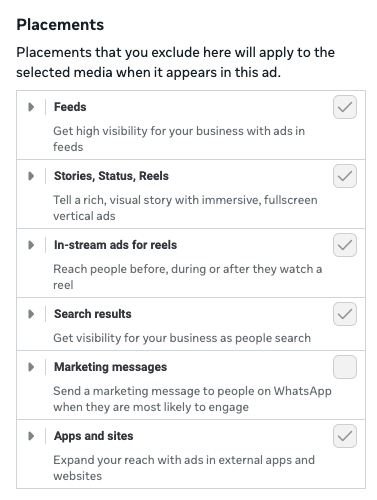
If you are used to manually creating graphics for different placements, you can still manually configure image placement in the "media" section of your ad. Selecting "Customize Media" lets you exclude media from certain placements. For example, if you format a graphic for reels and don't want it to show up in the feed, you can toggle off all placements except 'reels'. See the UI below.
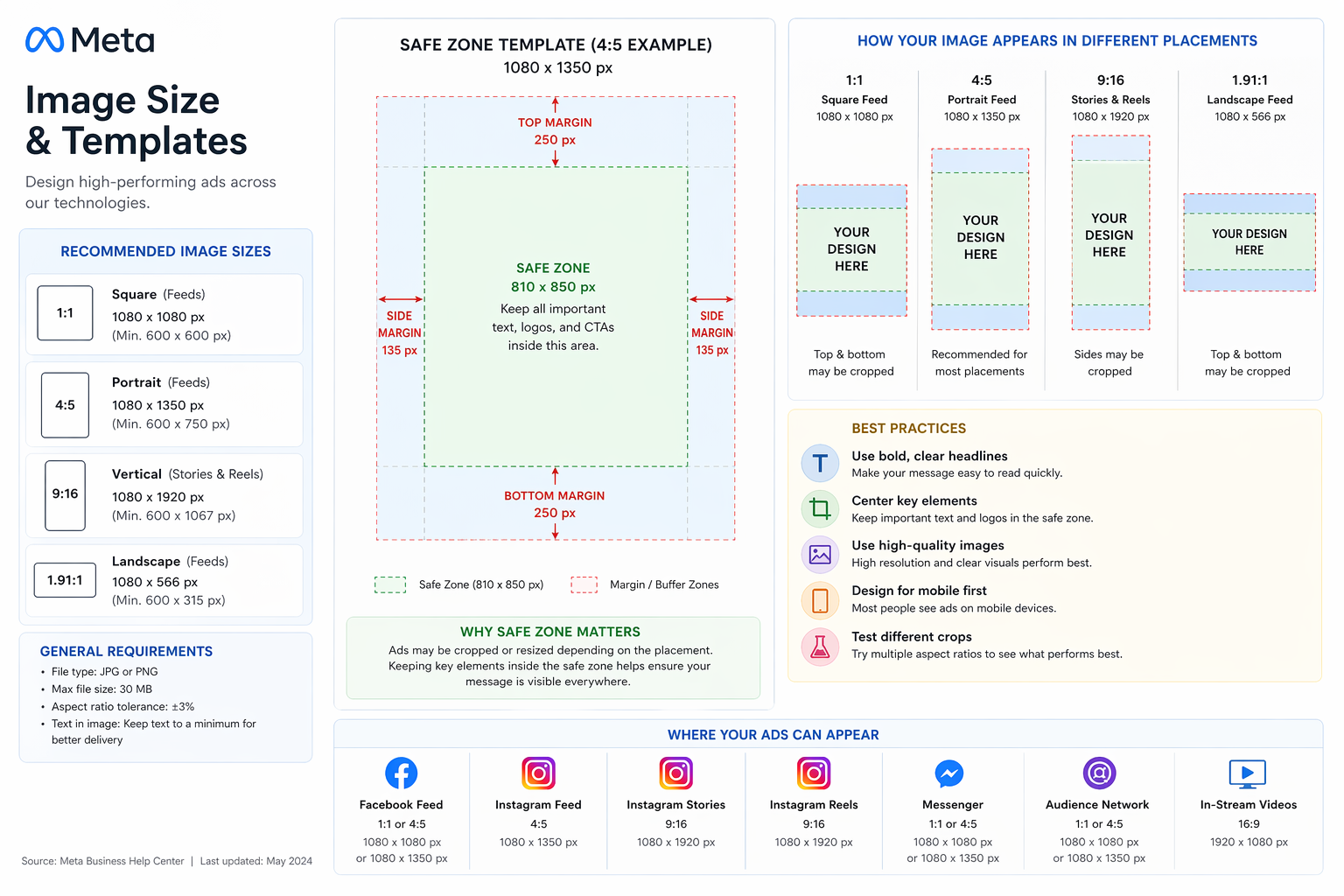
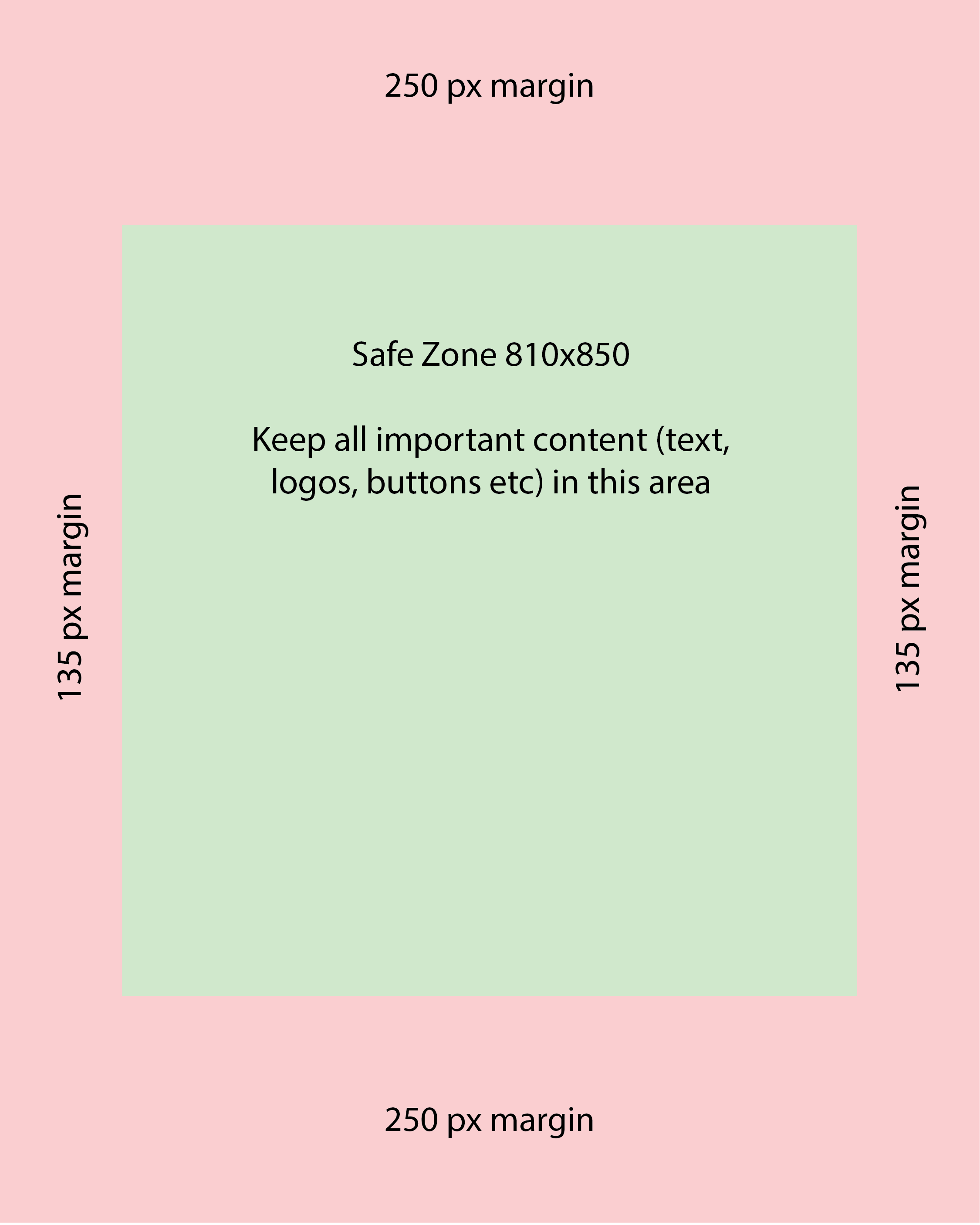
For some ads, it may be easier to provide a single piece of creative vs. uploading variations by ad placement spot, allowing Meta's AI overlords to place the ad where they think it will perform best. Below is Meta's documentation on preparing these graphics. We've also developed a PNG that you can download and use as a template, see below.
What do I need to know about Advantage+ Audience?
Advantage+ Audience is Meta's default AI targeting; it's been an audience targeting option for years. For some products, it works great, using your inputs as suggestions rather than constraints that it expands from based on performance.
For Advantage+ audiences, only location and minimum age are hard constraints. This article is already wicked long, so if you want to take a deep dive on Advantage+ audiences, below are two articles that can help.
A Few More Tactical Tools
Meta's Documentation provides a detailed breakdown of creating a campaign in the Advantage+ campaign experience.
Explore the Advantage+ Experience.
Check out Admove's Advantage+ creative best practices for 2026.
Don’t feel like following along with meta’s changes?
Red Brick can manage paid social for you!
The Red Brick team is here to help! Our team of veterinary-specific marketing experts keeps a pulse on key changes happening in the industry and with our channel partners, like Meta. We can manage high-performing Meta lead generation campaigns for your brand.